

Stop Teleprompter-ing Your AI Provider and Create Subagents, Skills & Commands
Moving from prompt dependency to intelligent agent systems
Most people are still using AI like a teleprompter.
They type a prompt. They wait. They get a response. They copy-paste it somewhere. Then they do it again. And again. Every interaction starts from zero. Every conversation forgets what came before.
This isn't collaboration. It's dictation with extra steps.
In 2026, if you're still teleprompter-ing your AI provider, you're missing the entire shift happening underneath you.
The Teleprompter Problem
When you use AI as a teleprompter, you're treating a potentially autonomous system as a one-shot text generator. The pattern looks like this:
- You write a detailed prompt
- You wait for the response
- You manually evaluate the output
- You refine and re-prompt
- You lose all context when you close the chat
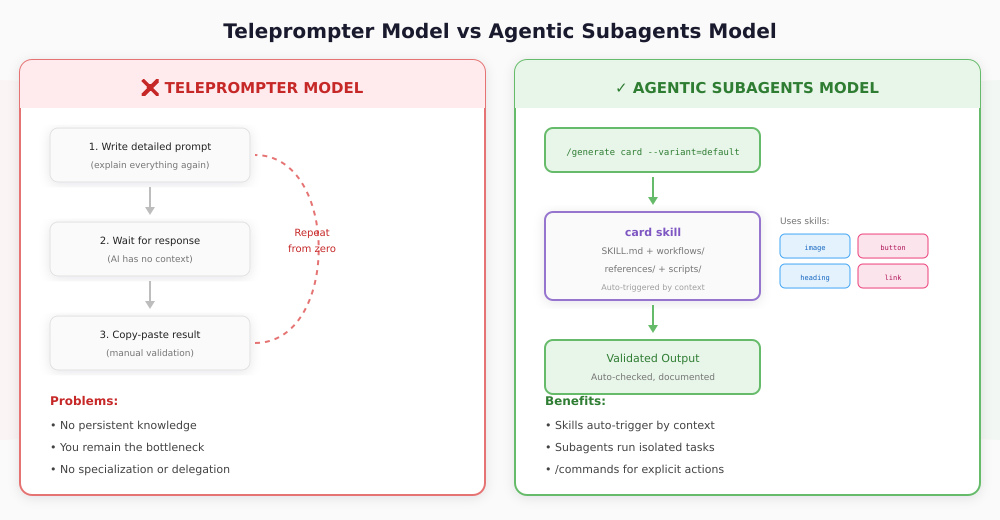
This model has three fatal flaws:
No persistent knowledge. Every conversation is a blank slate. You explain the same context repeatedly. Your AI doesn't know your codebase, your preferences, your constraints, or your history.
No delegation. You remain the bottleneck. Every decision, every validation, every next step requires your input. The AI waits for you to tell it what to do next.
No specialization. You use one generic interface for everything coding, documentation, design, testing, deployment. One prompt style. One context window. One conversation doing the work of many.
The teleprompter model treats AI as a tool. But tools don't scale autonomy. Agents do.
What Changes When You Think in Agents
In Claude Code, the agent architecture consists of three primitives:
- Subagents: Specialized Claude instances with isolated context windows (~/.claude/agents/)
- Skills: Auto-triggered knowledge modules with SKILL.md files (~/.claude/skills/)
- Commands: User-triggered /slash commands for explicit actions (~/.claude/commands/)
The key difference from traditional prompting:
- Skills are triggered automatically by Claude based on context
- Commands require you to type
/commandexplicitly - Subagents run in a separate context with their own tools
Consider the difference:
Teleprompter approach:
"Write me a card component with an image, title, body text, and a primary button following our design system patterns and accessibility standards..."
Claude Code approach:
/generate card --variant=default --with-image=true --with-button=trueThe first is a request. The second invokes a skill that already knows what a card is, what your design system requires, what accessibility standards apply, and how to validate its own output.
The Architecture: Subagents, Skills & Commands
Here's the structure that replaces the teleprompter model:
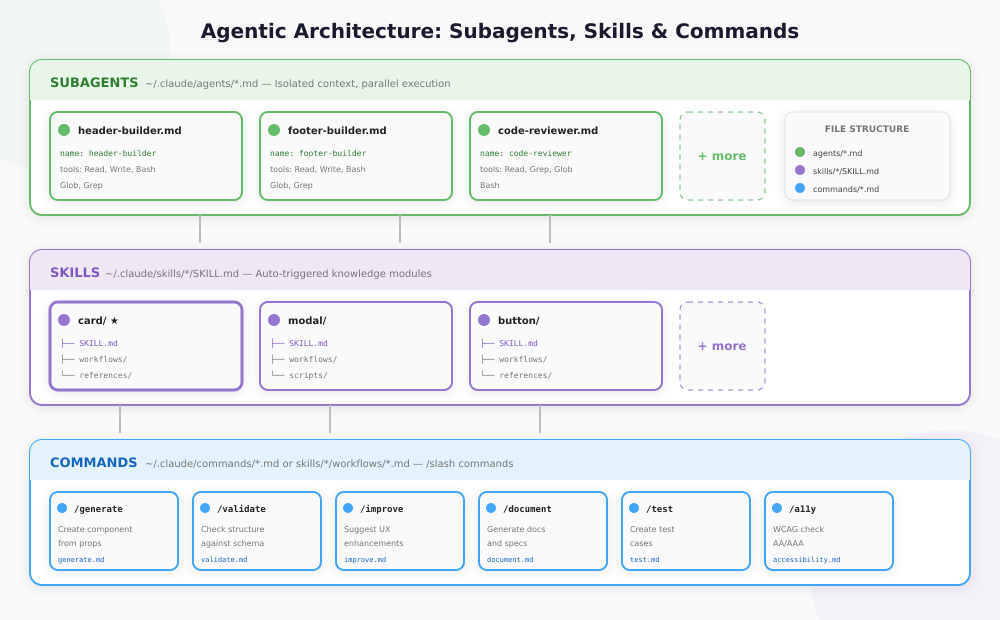
Level 1: Subagents
Subagents are standalone markdown files in ~/.claude/agents/ that execute work in parallel. They have their own context windows and can invoke skills.
~/.claude/agents/
├── header-builder.md
├── footer-builder.md
└── dashboard-builder.md
Each subagent file has YAML frontmatter:
- name: Clear identifier
- description: What it does and when to invoke it
- tools: Allowed capabilities (Read, Write, Bash, Grep, Glob)
Example subagent (header-builder.md):
---
name: header-builder
description: Build complete header components with navigation
tools: Read, Write, Bash, Glob, Grep
---  You are a header component specialist...
Level 2: Skills
Skills are auto-triggered knowledge modules. When you ask Claude something that matches a skill's purpose, Claude automatically applies it.
~/.claude/skills/
├── card/
│   ├── SKILL.md
│   ├── workflows/
│   │   ├── generate.md
│   │   ├── validate.md
│   │   └── improve.md
│   ├── references/
│   │   └── schema.yml
│   └── scripts/
│       └── validate.py
This follows Atomic Design methodology: atoms, molecules, organisms. Each skill is an expert in exactly one thing. When you need a card, the card skill auto-triggers.
Each skill knows:
- The component's schema (props, slots, variants)
- Your design system conventions
- Framework-specific patterns
- WCAG accessibility requirements
- Related skills it can reference
Level 3: Commands
Commands are user-triggered shortcuts. You type /command to invoke them. They live in skill workflows or globally:
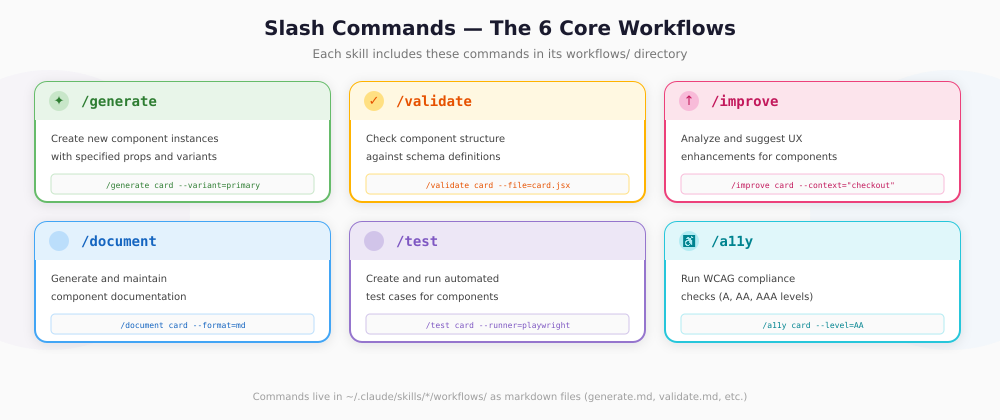
~/.claude/skills/card/workflows/
├── generate.md    # /generate card
├── validate.md    # /validate card
├── improve.md     # /improve card
├── document.md    # /document card
├── test.md        # /test card
└── a11y.md        # /a11y card
Commands can invoke subagents for planning, then main Claude handles execution. This gives you structured workflows with full tool access.
Complete Example: Card Skill
Let me show you exactly how this works with a real skill:
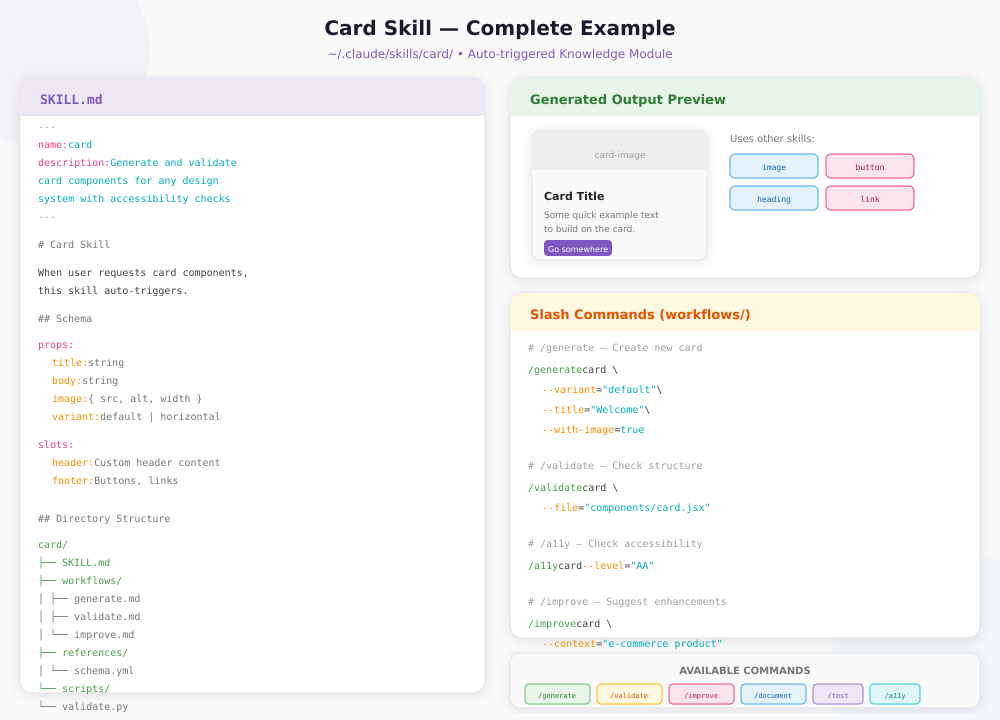
The Skill Structure
~/.claude/skills/card/
├── SKILL.md           # Core prompt and instructions
├── workflows/         # Slash commands
│   ├── generate.md
│   ├── validate.md
│   ├── improve.md
│   ├── document.md
│   ├── test.md
│   └── a11y.md
├── references/        # Documentation loaded into context
│   └── schema.yml
└── scripts/           # Executable Python/Bash scripts
    └── validate.py
The SKILL.md File
---
name: card
description: Generate and validate card components
  for any design system with accessibility checks
---  # Card Skill  When user requests card components, this skill
auto-triggers based on context.
 ## Schema  props:
  title: string
  body: string
  image: { src, alt, width }
  variant: default | horizontal | overlay
 slots:
  header: Custom header content
  footer: Buttons, links
 ## Related Skills  This skill can reference:
- image
- heading
- button
- link
- text
Using Slash Commands
Generate a new card:
/generate card \ --variant="default" \ --title="Welcome" \ --with-image=true \ --with-button=trueValidate an existing card:
/validate card \ --file="components/card.jsx"Check accessibility compliance:
/a11y card --level="AA"Improve UX for a specific context:
/improve card \ --context="e-commerce product listing" \ --focus="conversion"What Happens Under the Hood
When you invoke /generate card, Claude:
- Triggers the card skill: SKILL.md loads into context
- Reads the schema: Validates your parameters against allowed props
- References other skills: image, heading, button skills provide their expertise
- Runs the workflow: workflows/generate.md executes
- Self-validates: Runs the validate workflow on its own output
- Returns the result: Provides the component plus any warnings
The card skill doesn't just generate markup. It orchestrates a system of specialists, each contributing their domain expertise.
Why This Matters: From Builder to Systems Thinker
The teleprompter model keeps you as the operator. The skill model makes you the architect.
When I shifted from writing prompts to designing skills, several things changed:
I stopped repeating context. Each skill already knows its domain. I don't explain what a card is every time I need one.
I started thinking in composition. A page isn't one prompt it's a coordination of organisms, which are coordinations of molecules, which are coordinations of atoms. Each layer has its own skill.
I delegated validation. Instead of manually reviewing every output, the /validate command checks structure, the /a11y command checks WCAG compliance, and the /test command runs automated checks. I review exceptions, not every result.
I built institutional knowledge. When I improve a skill's SKILL.md, that improvement persists. The system gets smarter over time, not just during a single conversation.
This is the difference between using AI and building with AI.
The Design Is the Code
In my work with design systems, I've arrived at a principle: The Design Is the Code.
When design tokens, component schemas, and agent configurations align, there's no translation layer between what designers specify and what developers build. The specification is the implementation.
Here's how agents make this real:
# The schema IS the source of truth schema:   props:     variant:       type: string
      enum: [primary, secondary, success, danger, warning, info]       default: primary
    size:       type: string
      enum: [sm, md, lg]       default: md
 tokens:   colors:     - --btn-bg
    - --btn-color
    - --btn-border-color
This schema isn't just documentation. It's the source of truth. The agent generates components from it. The validator checks against it. The design tokens reference it. One file, many uses.
When a designer updates the token values in Figma, the agent configuration updates. When the agent configuration updates, the generated components update. The design is the code because they're both derived from the same schema.
How to Start Building with Claude Code
If you're ready to move past the teleprompter model, here's a practical path:
Step 1: Identify Your Domains
What areas of your work are repetitive, rule-bound, and context-dependent? Those are skill candidates:
- Code generation
- Documentation
- Testing
- Review and validation
- Design system management
- Deployment and DevOps
Step 2: Create Your First Skill
Start with a simple SKILL.md:
---
name: my-component
description: Generate and validate my-component
---  # My Component Skill  When user asks about my-component, apply these rules...
Step 3: Add Workflows (Commands)
Create the six core commands in workflows/:
| Command | Purpose |
|---|---|
/generate | Create new artifacts |
/validate | Check existing artifacts |
/improve | Suggest enhancements |
/document | Explain and record |
/test | Create automated tests |
/a11y | Check WCAG compliance |
Each command is a markdown file with instructions.
Step 4: Establish Skill References
Skills can reference other skills:
## Related Skills  This skill uses:
- image (for card images)
- button (for CTAs)
- heading (for titles)
Map these dependencies. The hierarchy should match your domain's natural structure.
Step 5: Create Subagents for Complex Tasks
When you need isolated context or parallel execution, create a subagent file in ~/.claude/agents/:
---
name: header-builder
description: Build complete header components with navigation, logo, and search
tools: Read, Write, Bash, Glob, Grep
---  You are a header component specialist. When building headers:
1. Check existing header patterns in the codebase
2. Use the nav, button, logo skills for sub-components
3. Ensure responsive design and accessibility
Building Your Skill Library
Structure your skills following Atomic Design:
| Type | Role | Examples |
|---|---|---|
| Atoms | Basic building blocks | button, input, checkbox, avatar, badge, icon, link, image |
| Molecules | Combinations of atoms | card, modal, tabs, accordion, alert, dropdown, toast |
| Organisms | Complex components | header, footer, dashboard, login-form, hero, sidebar |
Each skill:
- Has its own
SKILL.mdconfiguration - Has
workflows/with slash commands - Has
references/with documentation - Has
scripts/for automation - Knows which other skills it references
This creates a consistent, scalable system where Claude auto-triggers the right skill based on context.
The Future Is Agentic
Brad Frost, the creator of Atomic Design, has been talking about this shift: design systems must become machine-readable infrastructure because AI agents are now assembling UIs with the same components human teams use.
This isn't a prediction about 2030. It's happening now.
If your design system can't be parsed by an agent, it's becoming legacy. If your development workflow requires a human to prompt every step, it doesn't scale. If your AI interactions start from zero every time, you're wasting accumulated knowledge.
The teleprompter model was fine when AI was a novelty. It's not fine when AI is infrastructure.
Stop prompting. Start designing.
Build agents. Give them skills. Let them coordinate.
The future belongs to those who architect systems, not those who write scripts.
Building agentic design systems for the future of web development.
Further Reading
- The Design Is the Code My exploration of cellular automata thinking in design systems
- Atomic Design by Brad Frost The methodology behind component hierarchies
- Designing Systems That Build Themselves From builder to systems thinker
